
Surely you’re not going live without a strategy, are you? You must figure out several ways to promote your live streams to make your live streaming strategy a successful one.
Where there are numerous other means of increasing engagement on your live streams, OneStream Live experts have curated a list of the most effective ways for live promotion below.
- Plan and schedule ahead to build anticipation and maximize attendance for your live streams.
- Promote across all platforms to boost visibility and attract diverse audience segments.
- Engage viewers in real time through interactive chats, polls, and giveaways.
- Use multistreaming tools like OneStream Live and strong branding to expand reach and reinforce brand identity.
- Analyze and repurpose content post-broadcast to extend engagement and improve future performance.
Why Promote your Live Streams?
First things first, why do you need to promote your live streams?
- Promoting your live streams helps build brand awareness and recognition amongst both existing and potential audiences.
- It creates a sense of curiosity about your content/products/services.
- It plays a pivotal role in establishing long-term relationships with your customers and building brand loyalty.
- It grabs your audience’s attention and keeps them hooked and coming back for more.
- It offers you a competitive edge over rival brands.
How to Promote your Live Streams?
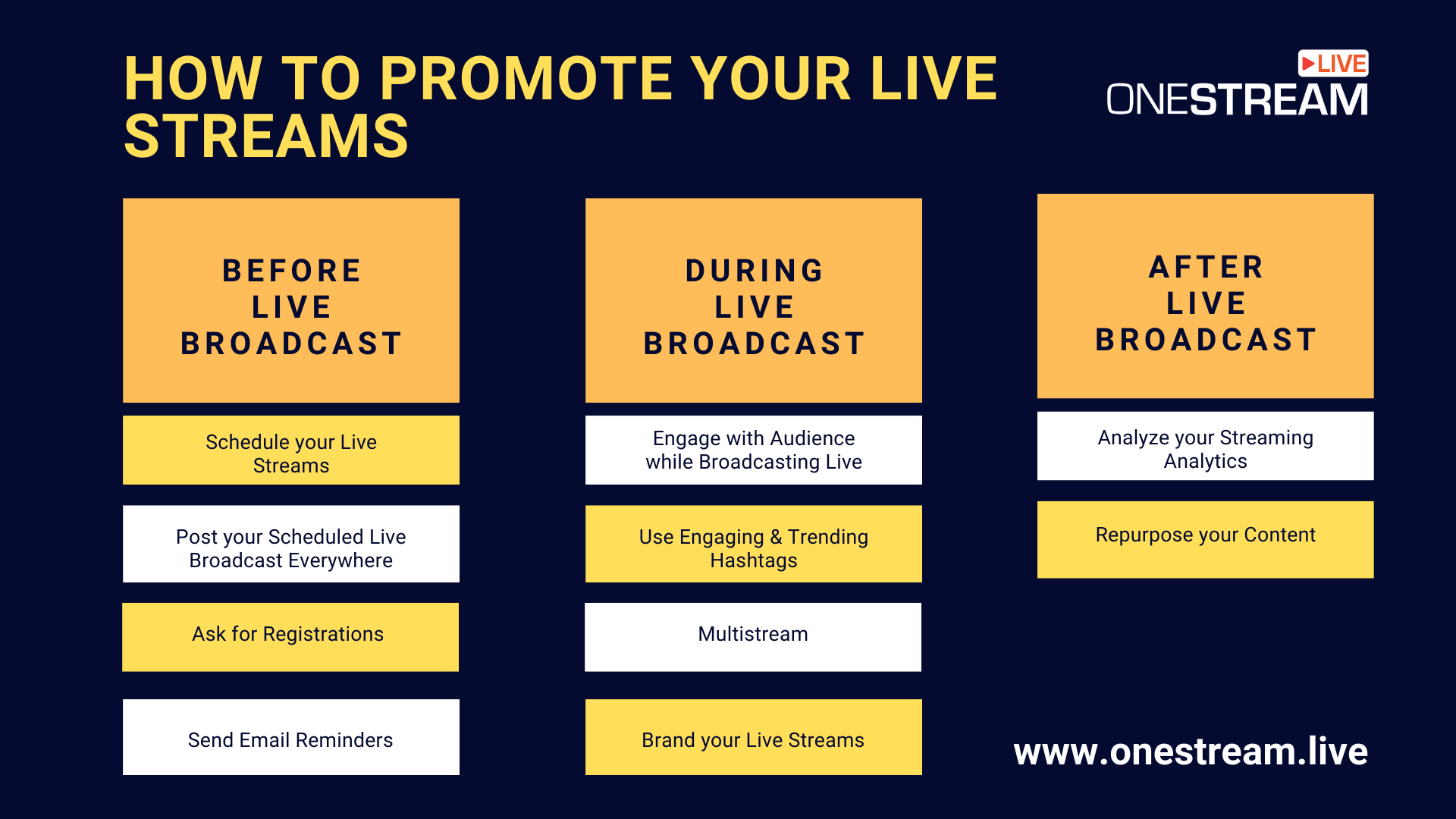
Before the Live Broadcast
1. Schedule your Live Streams
Although you can go live right away anytime, it’s always better to schedule your live broadcasts days in advance. This will give you enough time to promote your live stream, collect more contacts, and have a solid viewer base ready before you broadcast your content. You might want to add a showcard that illustrates the topic, date, and time of your scheduled live and let your viewers prepare for the event.
2. Post your Scheduled Live Broadcast Everywhere
Even if you plan to broadcast live on one or two channels, don’t forget to promote it on all other media anyway. So, let’s say you’re planning to promote YouTube live stream; you should still post the announcement on Twitter, YouTube, Instagram, TikTok, and all other social media platforms where you actively maintain your presence. Ask your friends, followers, partners, and all others to share and repost your live streams. Put up Instagram and Facebook stories regularly until the day of your broadcast. The catch is not to let any stone remain unturned.
3. Ask for Registrations
The most promising means of increasing viewership and promoting your streams is to ask people to register for your live streams. You can put in a little effort to collect valuable viewer contact information and use it for later purposes like email campaigns and live advertising. Here’s how you can get people to register for your live streams:
- Registration form on your landing page – create a registration form on your landing page. Include the link in your social media posts, emails, and ads to get more people to register. Once they have signed up, you can regularly send them stream reminders.
- Sign-up forms – if you do not have your website, you can create a form using different online forms like Google Forms, collect the necessary viewer data, and save it for later use.
4. Send Email Reminders
Keep a set of emails ready before every live broadcast to send out to those who have subscribed to your live streams. These should be sent out as reminders 2-5 days before the actual broadcast and must contain all the essential information regarding your next event: topic, date and time for the broadcast, and which channel/platform to tune into. Email marketing is the new marketing hack in the live streaming industry.
During the Live Broadcast
5. Engage with Audience while Broadcasting Live
With prep complete, now its showtime. During the broadcast, ask your viewers to like your page, subscribe to your channel, join your community, and promote your channel across other platforms. Ask engaging questions with your audience to allow them to interact with you in real-time. Plan giveaways to ensure maximum participation from your audience. Ask them to comment on your streams and respond to them in real-time using OneStream’s Live Unified Chat feature. The more people interact with your live streams, the more the chances of your video becoming visible to others.
Read More: How to Engage Maximum Audience During a Live Stream?
6. Use Engaging & Trending Hashtags
Hashtags play a critical role in creating a buzz around your live broadcast and making it easier for viewers to find all the relevant posts. Hashtags represent your event and your brand, helping people recognize and associate with your live stream. Make sure it’s short and simple so people can memorize and associate it with you. Don’t just take it from us, research indicates that posts optimized with hashtag strategies get 50% more engagement than those without it in 2025.
You can enhance the engagement further by incorporating a social wall that displays live hashtag feeds during events, encouraging attendees to participate and share their experiences in real time.
7. Multistream
Multistreaming is the most effective promotional mechanism and the most effective tool for growing your audience. You must reach out and grab your audience wherever they hang out the most. With OneStream Live, you can broadcast your live streams, whether pre-recorded or real-time, to more than 40 social media platforms (like Facebook, YouTube, Instagram, X (Twitter), and Twitch) and the web simultaneously.
Read: Create & Multistream your Broadcasts with OneStream Studio
8. Brand your Live Streams
Never miss a chance to brand your live streams. Add graphics and custom overlays to your live streams. Use your photo as the profile picture on your channels to help establish a personal connection with your audience. Use OneStream Live to add custom thumbnails to your videos and brand your live streams. This will create an overall memorable experience for your target audience, enhance your brand recognition and recall, and promote your content across your audience.
After the Live Broadcast
9. Analyze your Streaming Analytics
Analytics, better known as the success metrics of the data world, are an effective mechanism for measuring the performance of your online video efforts. Some of these metrics are pretty straightforward, and the majority of people are aware of how to assess them to measure the success of their live streams.
For example, the number of views of a live stream on just about any platform is the most basic metric for video creators to measure their outreach. However, there are several advanced-level analytics that large-scale businesses and marketers must actively assess to measure the success of their live streaming strategy: visitor hits, watch time, average duration, traffic source, geographical hotspots, etc.
10. Repurpose your Content
If the live broadcast is over doesn’t mean your job is done. You can still do a lot with your video content, repurpose it, and use it to promote your broadcast and keep people engaged. You can plug out the most valuable points and redirect them to your audiences in the form of audio podcasts, blogs, graphics, trimmed video clips, transcripts, text documents, and a lot more. You can even save the video to broadcast as a pre-recorded live stream later.
Wrapping Up
Promoting your live streams is an ongoing process. It begins with the pre-event phase, from creating teasers to sharing event info through email and social media marketing, the live broadcast phase, and the post-broadcast stage itself. Paying close attention to your live stream promotion can significantly facilitate you in identifying what does and what doesn’t work for you. And this will eventually help you streamline your live streaming strategy for future broadcasts.

FAQs
You can promote a live stream by sharing teasers, using social media posts, and scheduling reminders to build anticipation.
Effective stream marketing comes from consistency, cross-promotion on multiple platforms, and engaging directly with your audience.
Attract viewers by selecting the optimal time, refining titles and thumbnails, and incorporating interactive elements such as polls or Q&A sessions.
Grow your Twitch audience by networking with other creators, multistreaming to expand your reach, and utilizing highlights or clips to keep your content discoverable.
OneStream Live is a cloud-based live streaming solution to create, schedule, and multistream professional-looking live streams across 45+ social media platforms and the web simultaneously. For content-related queries and feedback, write to us at [email protected]. You’re also welcome to Write for Us!